
Real-Time A2A Transfers Using RTP® and ISO 20022 Integrated with QuickBooks® QBO
Say Goodbye to Delays, Hello to Real-Time Payment Certainty

 To empower businesses with
real-time financial certainty by delivering seamless,
secure, and standards-based RTP® transactions using ISO
20022 messaging—fully integrated into QuickBooks® QBO.
To empower businesses with
real-time financial certainty by delivering seamless,
secure, and standards-based RTP® transactions using ISO
20022 messaging—fully integrated into QuickBooks® QBO.
TodayPayments.com leadung
the evolution of modern payment workflows with a
platform that integrates RTP® and FedNow® real-time
payments into QuickBooks® QBO and enterprise
systems. Our focus is empowering payers and payees with
A2A money transfers, full ISO 20022 batch
processing, and irreversible good funds that
settle instantly across mobile, POS, MOTO, and ecommerce
environments.
In the era of digital transformation, businesses can no longer afford the latency of outdated ACH, check, or manual wire systems. Real-time payments via RTP® (Real-Time Payments) and FedNow® bring immediate, irrevocable good funds settlement—dramatically improving liquidity, reconciliation, and customer experience.
By using A2A (Account-to-Account) transfers powered by ISO 20022 messaging standards, merchants and platforms gain full control over how and when payments are initiated, received, and reported.
Integrated RTP® Real-Time Transfers Directly Into QuickBooks® QBO
With TodayPayments.com's RTP® integration into QuickBooks® Online (QBO):
- You can send and receive real-time payments directly within your accounting workflow.
- Whether you're paying vendors or invoicing clients, payments settle in seconds.
- All transactions are recorded with remittance-rich ISO 20022 data, enabling full audit trails and accurate bookkeeping.
See
the features
QuickBooks® ACH, Cards, FedNow and Real-Time Payments
- Payment processing for all QuickBooks desktop, Pro, Premier, Enterprise and also QBO QuickBooks Online Our software is designed for simplicity and ease-of-use.
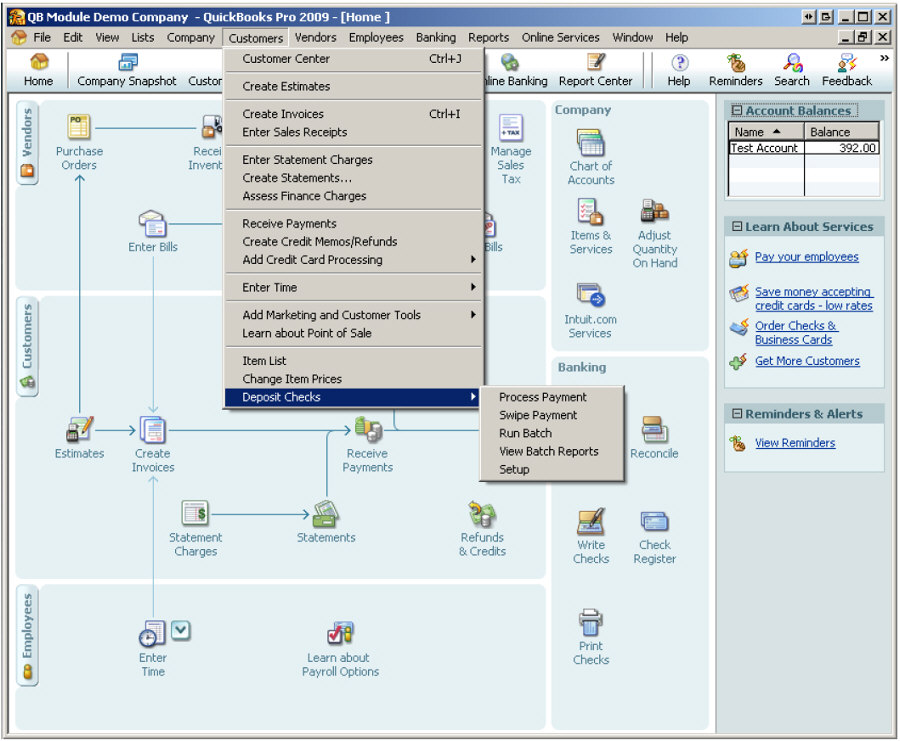
- ~ Automate Account Receivable Collection
- ~ Automate Account Payable Payments
- ~ One-time and Recurring Debits / Credits
Secure QB Plugin payment processing through QuickBooks ® specializes in the origination of moving money electronically.
Batching and Recurring Payments Using ISO 20022 with RTP® & FedNow®
Using batch files in Excel, .XML, or JSON, merchants can automate:
- Recurring payroll
- Monthly subscriptions
- On-demand invoice settlements
Upload these files to any bank or credit union that supports RTP® or FedNow®, and instantly push credits with final settlement and zero chargeback risk.
Each Request for Payment (RfP™) can be sent via:
- Mobile text (SMS)
- Email link
- Secure hosted payments page
- QR Code prompts at POS or on invoices
RTP® Payment Parameters, Attributes, Benefits & Features
|
Element |
Description |
|
Real-Time A2A Transfers |
Send money instantly from Payer to Payee bank accounts with no intermediaries or delays |
|
ISO 20022 File Format |
Use rich data formats including .XML, JSON, and Excel for structured, standards-compliant messaging |
|
Embed RTP® payment functionality directly inside your accounting and receivables interface |
|
|
Batch Upload Support |
Upload one-time or recurring payment files to any supported financial institution |
|
Request for Payment (RfP™) |
Trigger payments with mobile, email, or hosted page prompts |
|
Hosted Payment Pages |
Enable secure payer-side completion via fully branded checkout pages |
|
Irrevocable Settlement |
Real-time payments mean no NSF, reversals, or chargebacks—good funds guaranteed |
|
POS, MOTO, Ecommerce Ready |
Works across all payment environments—brick-and-mortar, online, and phone orders |
|
BNPL, ACH & Card Interoperability |
Give payers full flexibility while ensuring instant credit for payees |
Why Real-Time RTP® Payments Are the Future of Business Settlements
Today’s merchants demand faster, more reliable money movement. By leveraging real-time A2A payments via RTP® with ISO 20022, businesses can:
- Shorten the accounts receivable cycle
- Improve cash flow visibility
- Reduce payment processing fees
- Automate recurring settlement workflows
- Eliminate disputes and chargebacks
All while delivering a better, faster payment experience for your customers and partners.
Integrating real-time transfer capabilities from a customer/buyer/payer to a merchant/seller/payee through QuickBooks using SecureQBPlugin.com can streamline your payment processes and improve financial management. Here’s a detailed guide on how to set this up and the benefits it offers:
Steps to Integrate Real-Time Transfers using SecureQBPlugin.com:
- Sign Up and Configure SecureQBPlugin.com:
- Visit SecureQBPlugin.com and create an account.
- Configure your account settings to integrate with QuickBooks Online (QBO) or QuickBooks Enterprise.
- Install the Plugin:
- Download and install the SecureQBPlugin for your QuickBooks version.
- Follow the installation guide provided by SecureQBPlugin to ensure proper setup and connectivity with QuickBooks.
- Enable Real-Time Payments:
- Navigate to the payment settings in SecureQBPlugin.
- Enable real-time payment options like FedNow and RTP (Real-Time Payments).
- Set up your bank account details to facilitate real-time transfers.
- Configure Payment Requests and Invoices:
- Set up templates for Request for Payments (RfP) that can be sent to customers.
- Configure your invoices to include real-time payment options, allowing customers to pay instantly.
- Training and Support:
- Train your staff on how to use the SecureQBPlugin interface and manage real-time payments.
- Utilize customer support from SecureQBPlugin for any setup or technical issues.
Benefits of Real-Time Transfers through SecureQBPlugin.com:
- Instant Payment Processing:
- Real-time payments ensure that funds are transferred immediately from the payer to the payee, improving cash flow and operational efficiency.
- Enhanced Customer Experience:
- Offering real-time payment options provides customers with a convenient and efficient way to pay, enhancing their overall experience.
- Improved Cash Flow Management:
- Immediate access to funds allows businesses to better manage their cash flow, reducing the need for short-term financing.
- Reduced Transaction Costs:
- Real-time payments often come with lower processing fees compared to traditional payment methods, reducing overall transaction costs.
- Automated Reconciliation:
- Payments made through SecureQBPlugin are automatically recorded and reconciled in QuickBooks, reducing manual data entry and errors.
- Security and Compliance:
- Real-time payments through SecureQBPlugin are secure and compliant with financial regulations, providing peace of mind for both merchants and customers.
Example Use Cases:
- E-commerce Transactions:
- An online retailer can integrate real-time payment options at checkout, allowing customers to pay instantly and receive immediate confirmation of their orders.
- Service-Based Businesses:
- Service providers, such as consultants or contractors, can send real-time invoices and receive instant payments upon completion of their services.
- Subscription Services:
- Businesses offering subscription services can set up recurring real-time payments, ensuring timely payments and uninterrupted service for their customers.
- Utilities and Bill Payments:
- Utility companies can offer real-time bill payment options, reducing late payments and improving customer satisfaction.
How to Use Real-Time Transfers in QuickBooks with SecureQBPlugin.com:
- Create an Invoice:
- In QuickBooks, create an invoice as usual and select the real-time payment option provided by SecureQBPlugin.
- Send a Payment Request:
- Use the SecureQBPlugin to send a Request for Payment (RfP) to the customer, including a link for real-time payment.
- Receive Payment:
- Once the customer makes the payment, funds are transferred instantly to your account.
- QuickBooks will automatically update the invoice status to paid and reconcile the transaction.
- Monitor Transactions:
- Use the SecureQBPlugin dashboard to monitor all real-time payment transactions and ensure they are correctly recorded in QuickBooks.
By integrating SecureQBPlugin.com with QuickBooks for real-time transfers, businesses can significantly enhance their payment processes, improve cash flow, and provide a better customer experience.
Activate Real-Time Payments for Your Business Now
With TodayPayments.com, you gain more than just payment rails—you get a powerful engine for growth. Send, request, and settle payments instantly using ISO 20022-compliant RTP® and FedNow® technology—all fully integrated with QuickBooks® QBO.
✅ Zero-day cash flow
✅
Hosted RfP™ pages
✅ Batch uploads in Excel,
XML, or JSON
✅ Instant, irreversible credits with rich
remittance data
Get started today with a real-time payments solution that helps your business move faster, smarter, and with complete certainty—only at https://www.TodayPayments.com
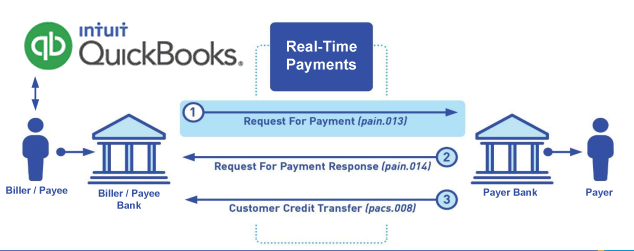
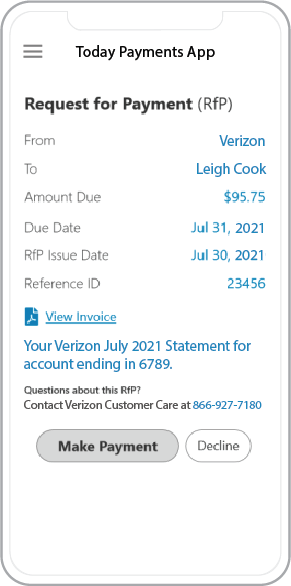 Call us, the .csv, text messaging and or .xml Request for Payment (RfP) file you need while on your 1st phone call! We guarantee our reports work to your Bank and Credit Union. We were years ahead of competitors recognizing the benefits of RequestForPayment.com. We are not a Bank. Our function as a role as an "Accounting System" in Open Banking with Real-Time Payments to work with Billers to create the Request for Payment to upload the Biller's Bank online platform. U.S. Companies need help to learn the RfP message delivering their bank. Today Payments' ISO 20022 Payment Initiation (PAIN .013) show how to implement Create Real-Time Payments Request for Payment File up front delivering message from the Creditor (Payee) to it's bank. Most banks (FIs) will deliver the message Import and Batch files for their company depositors for both FedNow and Real-Time Payments (RtP). Once uploaded correctly, the Creditor's (Payee's) bank continuing through a "Payment Hub", will be the RtP Hub will be The Clearing House, with messaging to the Debtor's (Payer's) bank.
Our in-house QuickBooks payments experts are standing ready to help you make an informed decision to move your company's payment processing forward.
Pricing with our Request For Payment Professionals
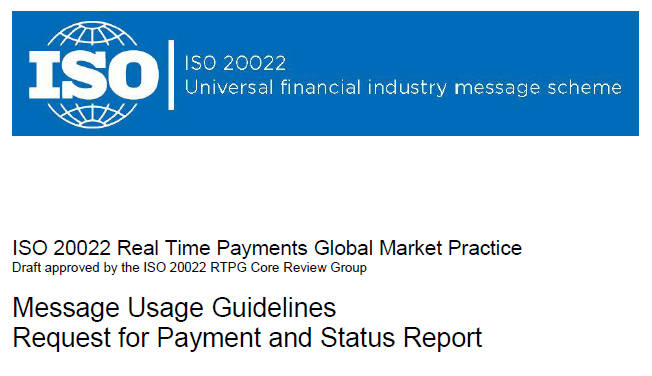
1) Free ISO 20022 Request for Payment File Formats, for FedNow and Real-Time Payments (The Clearing House) .pdf for you manually create "Mandatory" (Mandatory data for completed file) fields, start at page 4, with "yellow" highlighting. $0.0 + No Support
2) We create .csv or .xml formatting using your Bank or Credit Union. Using your invoice information database to create an existing Accounts Receivable file, we CLEAN, FORMAT to FEDNOW or Real-Time Payments into CSV or XML. Create Multiple Templates. You can upload or "key data" into our software for File Creation of "Mandatory" general file. Use either the Routing Number and Account Number for your Customers or use "Alias" name via Mobile Cell Phone and / or Email address.
Fees = $57 monthly, including Activation, Support Fees and Batch Fee, Monthly Fee, User Fee. We add your URI for each separate Payer transaction for additional Payment Methods on "Hosted Payment Page" (Request for file with an HTML link per transaction to "Hosted Payment Page" with ancillary payment methods of FedNow, RTP, ACH, Cards and many more!) + $.03 per Transaction + 1.5% percentage on gross dollar file,
3) Add integrating QuickBooks Online "QBO" using FedNow Real-time Payment using our Real-Time Transfer system.
Fees Above 2) plus $29 monthly additional QuickBooks Online "QBO" formatting, and "Hosted Payment Page" and WYSIWYG
4) Above 3) plus Create "Total" (over 600 Mandatory, Conditional & Optional fields of all ISO 20022 Pain .013) Price on quote.
Start using our FedNow Real-Time Payments Bank Reconciliation:
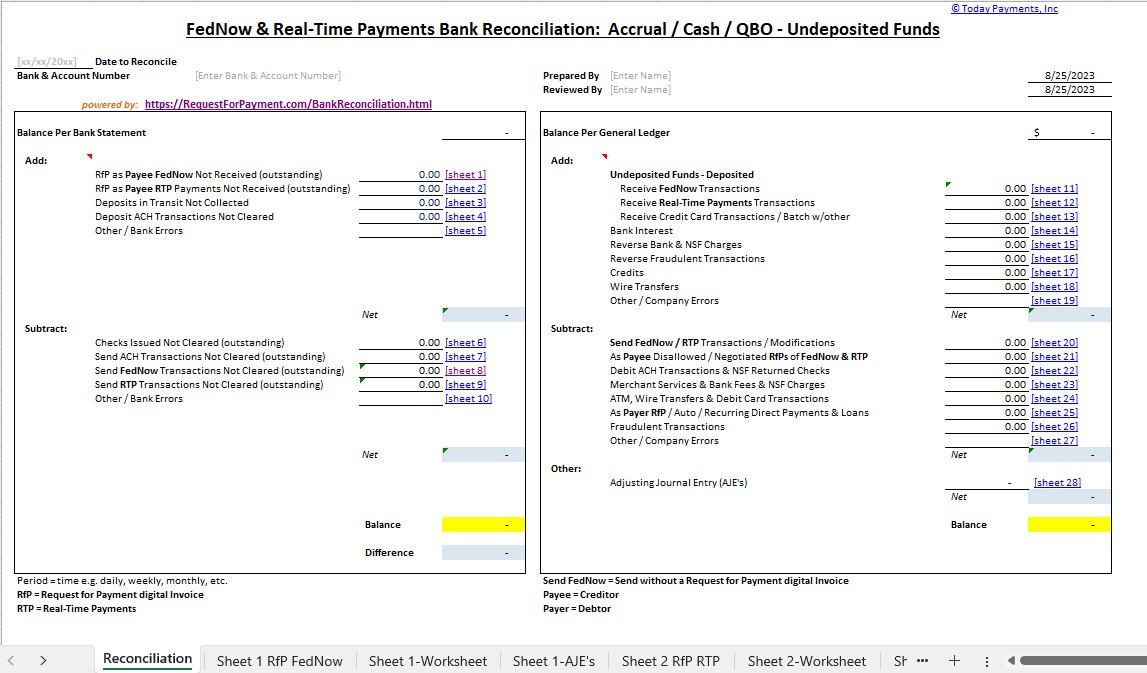
Dynamic integrated with FedNow & Real-Time Payments (RtP) Bank Reconciliation: Accrual / Cash / QBO - Undeposited Funds
Give Us A Call
(866) 927-7180